> ## Documentation Index
> Fetch the complete documentation index at: https://docs.sellagent.ai/llms.txt
> Use this file to discover all available pages before exploring further.
# Introduction
> Get to know **Milo**, the AI assistant built into **Sell Agent**.
# 👋 Introduction to Milo
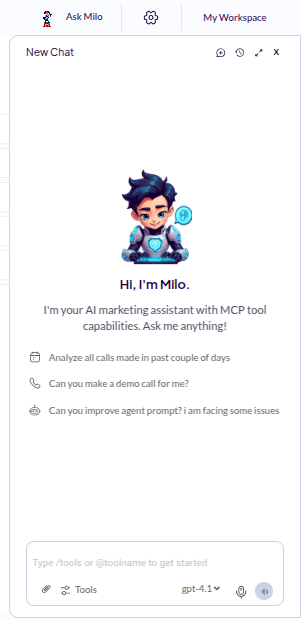
**Milo** is the built-in AI assistant inside [Sell Agent](https://app.sellagent.ai) that helps you control your dashboard using simple text commands.
Whether you're a sales agent managing leads or reviewing call data, Milo is here to simplify your work. Just type what you want **Milo** to do—like “Get all contacts for me”—and it will fetch the data or take the action for you.
You can also upload images, assign tasks, and interact with your dashboard—all through **Milo**, without needing to click through multiple tabs.
> 🎤 Don’t feel like typing? **Milo can hear you too**—just click on the microphone icon and start speaking. Milo will listen and respond accordingly.
Here's what **Milo** looks like inside the **Sell Agent** dashboard:
***
## 🚀 What Milo Can Do
* ✅ Fetch and display all your contacts
* ✅ Access post-call data and summaries
* ✅ Help you organize tasks
* ✅ Understand and process natural language commands
* ✅ Work directly with image inputs (e.g., uploading documents or screenshots)
* ✅ Accept **voice commands** using the built-in microphone feature
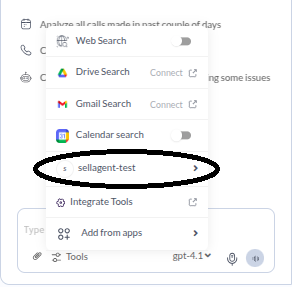
You can also explore **Milo’s** full capabilities by clicking on the **Tools** icon inside **Milo** and selecting **sellagent-test**.
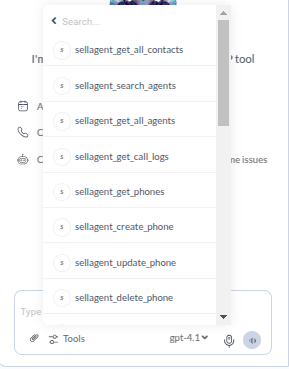
This will show you all the actions Milo can perform inside the **Sell Agent** dashboard.
### 📋 Action List (sellagent-test)
## ⚙️ Switch Between AI Models
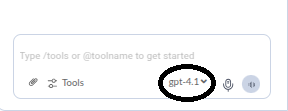
**Milo** supports multiple AI models so you can choose the one that best fits for your work—whether it's faster response, more creativity, or deeper analysis.
You can switch between models directly in the **Milo** interface:
> 🧩 Choose the model that works best for your task—whether you're summarizing leads, drafting messages, or exploring insights.
## 🧠 Why Use Milo?
**Milo** is like your smart assistant that never sleeps. It saves you time, reduces clicks, and gives you quick access to key features—all powered by intelligent AI.
Ready to get started? Just open your dashboard and start chatting with **Milo**. It’s that simple.
## 📘 Next Steps
Step-by-step guide to set up a MCP Server and connect it to **Sell Agent**.
 ***
## 🚀 What Milo Can Do
* ✅ Fetch and display all your contacts
* ✅ Access post-call data and summaries
* ✅ Help you organize tasks
* ✅ Understand and process natural language commands
* ✅ Work directly with image inputs (e.g., uploading documents or screenshots)
* ✅ Accept **voice commands** using the built-in microphone feature
You can also explore **Milo’s** full capabilities by clicking on the **Tools** icon inside **Milo** and selecting **sellagent-test**.
This will show you all the actions Milo can perform inside the **Sell Agent** dashboard.
***
## 🚀 What Milo Can Do
* ✅ Fetch and display all your contacts
* ✅ Access post-call data and summaries
* ✅ Help you organize tasks
* ✅ Understand and process natural language commands
* ✅ Work directly with image inputs (e.g., uploading documents or screenshots)
* ✅ Accept **voice commands** using the built-in microphone feature
You can also explore **Milo’s** full capabilities by clicking on the **Tools** icon inside **Milo** and selecting **sellagent-test**.
This will show you all the actions Milo can perform inside the **Sell Agent** dashboard.
 ### 📋 Action List (sellagent-test)
 ## ⚙️ Switch Between AI Models
**Milo** supports multiple AI models so you can choose the one that best fits for your work—whether it's faster response, more creativity, or deeper analysis.
You can switch between models directly in the **Milo** interface:
## ⚙️ Switch Between AI Models
**Milo** supports multiple AI models so you can choose the one that best fits for your work—whether it's faster response, more creativity, or deeper analysis.
You can switch between models directly in the **Milo** interface:
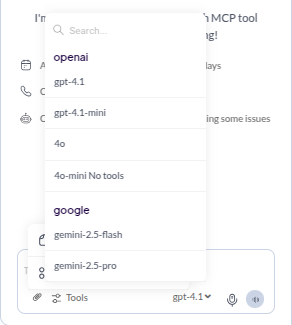 > 🧩 Choose the model that works best for your task—whether you're summarizing leads, drafting messages, or exploring insights.
## 🧠 Why Use Milo?
**Milo** is like your smart assistant that never sleeps. It saves you time, reduces clicks, and gives you quick access to key features—all powered by intelligent AI.
Ready to get started? Just open your dashboard and start chatting with **Milo**. It’s that simple.
## 📘 Next Steps
> 🧩 Choose the model that works best for your task—whether you're summarizing leads, drafting messages, or exploring insights.
## 🧠 Why Use Milo?
**Milo** is like your smart assistant that never sleeps. It saves you time, reduces clicks, and gives you quick access to key features—all powered by intelligent AI.
Ready to get started? Just open your dashboard and start chatting with **Milo**. It’s that simple.
## 📘 Next Steps