> ## Documentation Index
> Fetch the complete documentation index at: https://docs.sellagent.ai/llms.txt
> Use this file to discover all available pages before exploring further.
# Inbound Calls
> A step-by-step guide to receiving phone calls using **Sell Agent** imported numbers.
## ☎️ Receive Calls
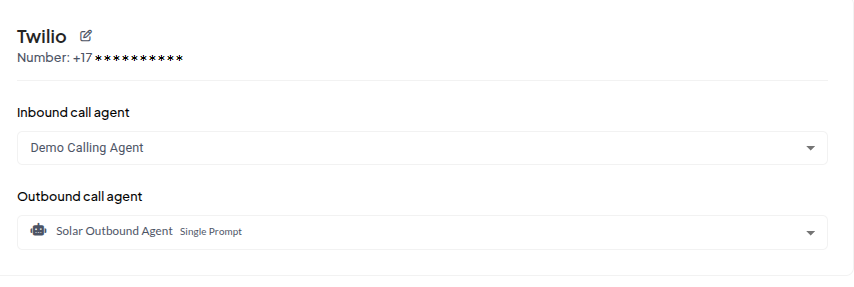
Once you've purchased and imported Twilio phone numbers into **Sell Agent**, you can start receiving inbound calls by assigning an **inbound agent** to the number.
## 🔗 Bind Voice Agents
To enable inbound calling, you **must bind a voice agent to the number**.
* You can assign **separate agents** for **inbound** and **outbound** calls.
* If you only want to make outbound calls and avoid callbacks, simply leave `inboundAgentId` unset.
* Likewise, to disable outbound calls, leave `outboundAgentId` unset.
✅ Once you bind an agent for **inbound**, your number will immediately begin receiving inbound calls.
 ***
## 📥 Inbound Call Webhook
In many cases, you may want to dynamically:
* Use **different agents** to handle inbound calls.
* Inject **dynamic variables** into the conversation (e.g., caller name, business name).
* Pass other context-specific data.
To support this, **Sell Agent** allows you to configure an **Inbound Call Webhook**. This webhook is triggered **when an inbound call is received**, giving you a chance to:
### 🛠️ Option 1: Programmatically
Set the webhook when creating or updating the agent — to review all available agent parameters, check the ****[Update Agent API](/api-reference/agent/update)****.
```json theme={null}
"webhookURL": "https://example.com/webhook"
```
### ⚙️ Option 2: Through Agent Settings UI
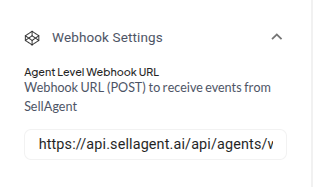
You can also configure the webhook directly in the dashboard under Agent Settings:
***
## 📥 Inbound Call Webhook
In many cases, you may want to dynamically:
* Use **different agents** to handle inbound calls.
* Inject **dynamic variables** into the conversation (e.g., caller name, business name).
* Pass other context-specific data.
To support this, **Sell Agent** allows you to configure an **Inbound Call Webhook**. This webhook is triggered **when an inbound call is received**, giving you a chance to:
### 🛠️ Option 1: Programmatically
Set the webhook when creating or updating the agent — to review all available agent parameters, check the ****[Update Agent API](/api-reference/agent/update)****.
```json theme={null}
"webhookURL": "https://example.com/webhook"
```
### ⚙️ Option 2: Through Agent Settings UI
You can also configure the webhook directly in the dashboard under Agent Settings:
 * Return a specific `agentId`
* Provide `dynamicVariables`
* Set the `language`, `voice`, or other options dynamically
### 🛠️ Example Webhook Response
Your webhook should return a JSON response like this:
```json theme={null}
{
"agentId": "agent_abc123",
"dynamicVariables": {
"first_name": "Alex",
"company": "Mint Cafe"
},
"language": "en",
"voice": "Emily"
}
```
* Return a specific `agentId`
* Provide `dynamicVariables`
* Set the `language`, `voice`, or other options dynamically
### 🛠️ Example Webhook Response
Your webhook should return a JSON response like this:
```json theme={null}
{
"agentId": "agent_abc123",
"dynamicVariables": {
"first_name": "Alex",
"company": "Mint Cafe"
},
"language": "en",
"voice": "Emily"
}
```