
👋 Introduction to Milo
Milo is the built-in AI assistant inside Sell Agent that helps you control your dashboard using simple text commands.
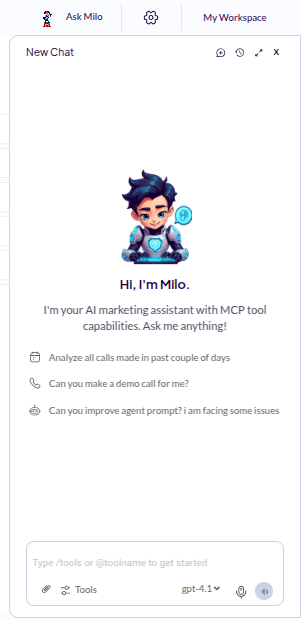
Whether you’re a sales agent managing leads or reviewing call data, Milo is here to simplify your work. Just type what you want Milo to do—like “Get all contacts for me”—and it will fetch the data or take the action for you.
You can also upload images, assign tasks, and interact with your dashboard—all through Milo, without needing to click through multiple tabs.
🎤 Don’t feel like typing? Milo can hear you too—just click on the microphone icon and start speaking. Milo will listen and respond accordingly.Here’s what Milo looks like inside the Sell Agent dashboard:
🚀 What Milo Can Do
- ✅ Fetch and display all your contacts
- ✅ Access post-call data and summaries
- ✅ Help you organize tasks
- ✅ Understand and process natural language commands
- ✅ Work directly with image inputs (e.g., uploading documents or screenshots)
- ✅ Accept voice commands using the built-in microphone feature
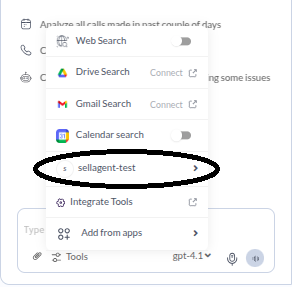
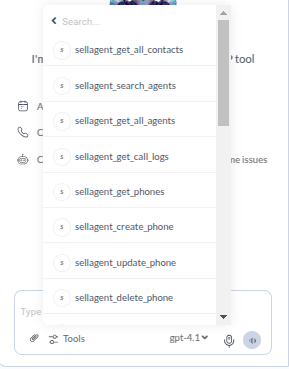
📋 Action List (sellagent-test)
⚙️ Switch Between AI Models
Milo supports multiple AI models so you can choose the one that best fits for your work—whether it’s faster response, more creativity, or deeper analysis. You can switch between models directly in the Milo interface: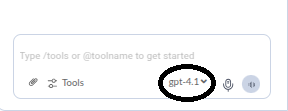
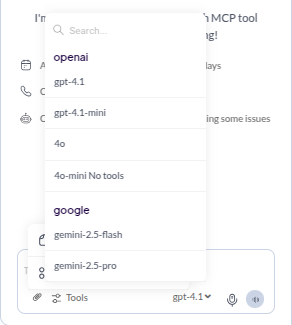
🧩 Choose the model that works best for your task—whether you’re summarizing leads, drafting messages, or exploring insights.
🧠 Why Use Milo?
Milo is like your smart assistant that never sleeps. It saves you time, reduces clicks, and gives you quick access to key features—all powered by intelligent AI. Ready to get started? Just open your dashboard and start chatting with Milo. It’s that simple.📘 Next Steps
Add Custom MCP Server
Step-by-step guide to set up a MCP Server and connect it to Sell Agent.